필요한 개념
Projcetion : 3D위치를 2D로 바꾸도록 하기위해

3D -> W,V,P -> Vp(Viewport) -> 2D
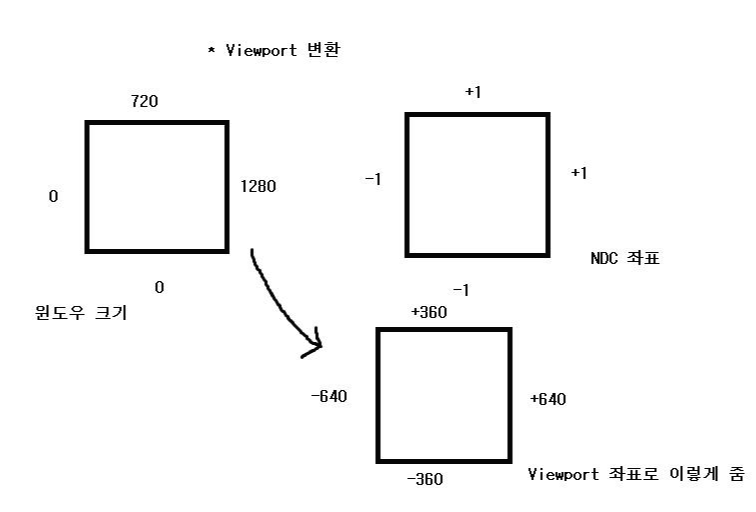
* Viewport변환
화면의 비율로 정규화된 값을
화면 공간으로 바꿔주면 된다.
원래는 렌더링 파이프라인대로 한다면 정규화된(-1 ~ +1) NDC공간(렌더링파이프라인에서 화면 비율을 만들기 위해 사용되는 좌표)으로 변환해줘야한다.
그러나 우리는 화면공간으로 해줄것이다.(가로 0 ~ 1280, 0 ~ 720)으로
이걸 통해서 3D 위치를 2D 좌표로 변환하여 텍스트도 넣을 수 있다. (본 위치에 텍스트를 넣었음)
Viewport.h
더보기
#pragma once

class Viewport
{
public:
	Viewport(float width, float height, float x = 0, float y = 0, float minDepth = 0, float maxDepth = 1);
	~Viewport();

	void RSSetViewport();
	void Set(float width, float height, float x = 0, float y = 0, float minDepth = 0, float maxDepth = 1);

	float GetWidth() { return width; }
	float GetHeight() { return height; }

	// 3D위치를 2D로 변환
	// Vector2로 리턴해도 되지만, 2D위치를 3D좌표로 변환한다고 생각하고 Vector3로
	void Project(Vector3* pOut, Vector3& source, Matrix& W, Matrix& V, Matrix& P);

private:
	float x, y;
	float width, height;
	float minDepth, maxDepth;

	D3D11_VIEWPORT viewport;
};
Viewport.Cpp
더보기
#include "Framework.h"
#include "Viewport.h"

Viewport::Viewport(float width, float height, float x, float y, float minDepth, float maxDepth)
{
	Set(width, height, x, y, minDepth, maxDepth);
}

Viewport::~Viewport()
{

}

void Viewport::RSSetViewport()
{
	D3D::GetDC()->RSSetViewports(1, &viewport);
}

void Viewport::Set(float width, float height, float x, float y, float minDepth, float maxDepth)
{
	viewport.TopLeftX = this->x = x;
	viewport.TopLeftY = this->y = y;
	viewport.Width = this->width = width;
	viewport.Height = this->height = height;
	viewport.MinDepth = this->minDepth = minDepth;
	viewport.MaxDepth = this->maxDepth = maxDepth;

	RSSetViewport();
}

void Viewport::Project(Vector3* pOut, Vector3& source, Matrix& W, Matrix& V, Matrix& P)
{
	// Projection : 3D -> W,V,P -> Vp -> 2D


	// 위치 - W->V->P == 위치 - W * V * P
	Vector3 position = source;

	Matrix wvp = W * V * P;
	// position 위치를 wvp공간으로 변환해야 하니까
	D3DXVec3TransformCoord(pOut, &position, &wvp);

	// Viewport변환
	//화면의 비율로 정규화된 값을
	//화면 공간으로 바꿔주면 된다.
	// 원래는 렌더링 파이프라인대로 한다면 정규화된(-1 ~ +1) NDC공간(렌더링파이프라인에서 화면 비율을 만들기 위해 사용되는 좌표)으로 변환해줘야한다.
	// 그러나 우리는 화면공간으로 해줄것이다.(가로 0 ~ 1280, 0 ~ 720)으로

	// x : 뷰표트가 가지고 있는 x(시작지점)
	pOut->x = ((pOut->x + 1.0f) * 0.5f) * width + x;
	// 밑에서 부터 위로 올라가는 좌표니까 -붙음
	pOut->y = ((-pOut->y + 1.0f) * 0.5f) * height + y;
	// 프로젝션의 z 비율을 만드는 식(이후 깊이를 다룰때 설명함)
	pOut->z = (pOut->z * (maxDepth - minDepth)) + minDepth;
}
ProjectionDemo.h
더보기
#pragma once
#include "Systems/IExecute.h"

class ProjectionDemo : public IExecute
{
public:
	virtual void Initialize() override;
	virtual void Ready() override {};
	virtual void Destroy() override;
	virtual void Update() override;
	virtual void PreRender() override {};
	virtual void Render() override;
	virtual void PostRender() override {};
	virtual void ResizeScreen() override {};

private:
	void Mesh();
	void Airplane();
	void Kachujin();
	void KachujinCollider();

	void Pass(UINT mesh, UINT model, UINT anim);

private:
	Shader* shader;

	CubeSky* sky;

	Material* floor;
	Material* stone;
	Material* brick;
	Material* wall;

	MeshRender* cube;
	MeshRender* cylinder;
	MeshRender* sphere;
	MeshRender* grid;

	ModelRender* airplane = NULL;

	ModelAnimator* kachujin = NULL;

	// Collider의 인스턴싱은 몇개 인지 모른다.(그래서 *하나 더 붙음)
	ColliderObject** colliders;

	// 나중에 Path 관리를 편하게 하기 위해
	vector<MeshRender*> meshes;
	vector<ModelRender*> models;
	vector<ModelAnimator*> animators;
};
ProjectionDemo.cpp
더보기
#include "stdafx.h"
#include "ProjectionDemo.h"

void ProjectionDemo::Initialize()
{
	Context::Get()->GetCamera()->RotationDegree(20, 0, 0);
	Context::Get()->GetCamera()->Position(1, 36, -85);


	shader = new Shader(L"55_Render.fx");

	sky = new CubeSky(L"Environment/GrassCube1024.dds");

	Mesh();
	Airplane();
	Kachujin();
	KachujinCollider();
}

void ProjectionDemo::Destroy()
{
	SafeDelete(shader);

	SafeDelete(sky);
	SafeDelete(cube);
	SafeDelete(cylinder);
	SafeDelete(sphere);
	SafeDelete(grid);

	SafeDelete(floor);
	SafeDelete(stone);
	SafeDelete(brick);
	SafeDelete(wall);

	SafeDelete(airplane);
	SafeDelete(kachujin);
}

void ProjectionDemo::Update()
{
	Vector3 position;
	airplane->GetTransform(0)->Position(&position);

	position.x -= 5;
	position.z = 0.0f;

	// 2D 위치로 변환
	Vector3 position2D;
	// world는 필요가 없다. position을 가져와서 써서
	Matrix W, V, P;
	D3DXMatrixIdentity(&W);
	V = Context::Get()->View();
	P = Context::Get()->Projection();
	// 2D 위치가 나옴
	Context::Get()->GetViewport()->Project(&position2D, position, W, V, P);

	// 2D 위치로 글자 출력
	Gui::Get()->RenderText(position2D.x, position2D.y, 1, 0, 0, "AirPlane");

	sky->Update();

	cube->Update();
	grid->Update();
	cylinder->Update();
	sphere->Update();

	airplane->Update();
	kachujin->Update();

	for (UINT i = 0; i < kachujin->GetTransformCount(); i++)
	{
		// 카추진 위치 얻어옴(업데이트 시킬)
		Matrix attach;
		kachujin->GetAttachTransform(i, &attach);

		position = Vector3(0, 0, 0);
		// position이 없고 world행렬 공간만 사용한다면
		// position에 0, 0, 0 주고 world만 그대로 넣어주면 된다.
		Context::Get()->GetViewport()->Project(&position2D, position, attach, V, P);

		// 글씨가 왼쪽 정렬이어서 왼쪽 위치 부터 나타남
		Gui::Get()->RenderText(position2D.x, position2D.y, 1, 1, 1, "Hand");

		// 얼마만큼 이동할지
		colliders[i]->Collider->GetTransform()->World(attach);
		colliders[i]->Collider->Update();
	}
}

void ProjectionDemo::Render()
{
	// 메인 뷰포트를 만들때 화면 넓이를 사용
	static float width = D3D::Width();
	static float height = D3D::Height();
	static float x = 0.0f;
	static float y = 0.0f;

	ImGui::InputFloat("Width", &width, 1.0f);
	ImGui::InputFloat("Height", &height, 1.0f);
	ImGui::InputFloat("X", &x, 1.0f);
	ImGui::InputFloat("Y", &y, 1.0f);

	Context::Get()->GetViewport()->Set(width, height, x, y);

	// Perspective의 FOV는 시야각을 결정한다.(기본은 PI / 4, 45도를 사용)
	// FOV(field of view) -> 시야각을 의미(더 자세한건 나중에 그림자할때 설명)
	static float fov = 0.25f;
	ImGui::InputFloat("Fov", &fov, 0.001f);

	// 0이 되면 안되는 이유가 0이면 내 눈안에 들어가 있는 것이다.
	// 피부정도를 약간 늘려준다 생각
	// 실제 내부적으로는 나누기 연산을 해서 0을 주면 안된다.
	// maxZ은 기본값 1000으로 되어있다.
	// WP가 완료되고 Viewport로 넘어갈때
	// minZ 이 0이 되고 maxZ이 1로 정규화됨
	static float minZ = 0.1, maxZ = 1000.0f;
	ImGui::InputFloat("minZ", &minZ, 1.0f);
	ImGui::InputFloat("MaxZ", &maxZ, 1.0f);

	Perspective* perspective = Context::Get()->GetPerspective();
	perspective->Set(D3D::Width(), D3D::Height(), minZ, maxZ, Math::PI * fov);

	sky->Render();

	Pass(0, 1, 2);

	wall->Render();
	sphere->Render();

	brick->Render();
	cylinder->Render();

	stone->Render();
	cube->Render();

	floor->Render();
	grid->Render();

	airplane->Render();
	kachujin->Render();

	for (UINT i = 0; i < kachujin->GetTransformCount(); i++)
		colliders[i]->Collider->Render();
}

void ProjectionDemo::Mesh()
{
	//Create Material
	{
		floor = new Material(shader);
		floor->DiffuseMap("Floor.png");
		//floor->SpecularMap("Floor_Specular.png");
		//floor->NormalMap("Floor_Normal.png");
		//floor->Specular(1, 1, 1, 20);

		stone = new Material(shader);
		stone->DiffuseMap("Stones.png");
		//stone->SpecularMap("Stones_Specular.png");
		//stone->NormalMap("Stones_Normal.png");
		//stone->Specular(1, 1, 1, 20);

		brick = new Material(shader);
		brick->DiffuseMap("Bricks.png");
		//brick->SpecularMap("Bricks_Specular.png");
		//brick->NormalMap("Bricks_Normal.png");
		//brick->Specular(1, 0.3f, 0.3f, 20);

		wall = new Material(shader);
		wall->DiffuseMap("Wall.png");
		//wall->SpecularMap("Wall_Specular.png");
		//wall->NormalMap("Wall_Normal.png");
		//wall->Specular(1, 1, 1, 20);
	}

	//Create Mesh
	{
		Transform* transform = NULL;

		cube = new MeshRender(shader, new MeshCube());
		transform = cube->AddTransform();
		transform->Position(0, 5, 0);
		transform->Scale(20, 10, 20);

		grid = new MeshRender(shader, new MeshGrid(5, 5));
		transform = grid->AddTransform();
		transform->Position(0, 0, 0);
		transform->Scale(12, 1, 12);

		cylinder = new MeshRender(shader, new MeshCylinder(0.5f, 3.0f, 20, 20));
		sphere = new MeshRender(shader, new MeshSphere(0.5f, 20, 20));
		for (UINT i = 0; i < 5; i++)
		{
			transform = cylinder->AddTransform();
			transform->Position(-30, 6, -15.0f + (float)i * 15.0f);
			transform->Scale(5, 5, 5);

			transform = cylinder->AddTransform();
			transform->Position(30, 6, -15.0f + (float)i * 15.0f);
			transform->Scale(5, 5, 5);


			transform = sphere->AddTransform();
			transform->Position(-30, 15.5f, -15.0f + (float)i * 15.0f);
			transform->Scale(5, 5, 5);

			transform = sphere->AddTransform();
			transform->Position(30, 15.5f, -15.0f + (float)i * 15.0f);
			transform->Scale(5, 5, 5);
		}
	}

	sphere->UpdateTransforms();
	cylinder->UpdateTransforms();
	cube->UpdateTransforms();
	grid->UpdateTransforms();

	// 렌더링 할 것들을 추가
	meshes.push_back(sphere);
	meshes.push_back(cylinder);
	meshes.push_back(cube);
	meshes.push_back(grid);
}

void ProjectionDemo::Airplane()
{
	airplane = new ModelRender(shader);
	airplane->ReadMesh(L"B787/Airplane");
	airplane->ReadMaterial(L"B787/Airplane");

	Transform* transform = airplane->AddTransform();
	transform->Position(2.0f, 9.91f, 2.0f);
	transform->Scale(0.004f, 0.004f, 0.004f);
	airplane->UpdateTransforms();

	models.push_back(airplane);
}

void ProjectionDemo::Kachujin()
{
	kachujin = new ModelAnimator(shader);
	kachujin->ReadMesh(L"Kachujin/Mesh");
	kachujin->ReadMaterial(L"Kachujin/Mesh");
	kachujin->ReadClip(L"Kachujin/Sword And Shield Idle");
	kachujin->ReadClip(L"Kachujin/Sword And Shield Walk");
	kachujin->ReadClip(L"Kachujin/Sword And Shield Run");
	kachujin->ReadClip(L"Kachujin/Sword And Shield Slash");
	kachujin->ReadClip(L"Kachujin/Salsa Dancing");


	Transform* transform = NULL;

	transform = kachujin->AddTransform();
	transform->Position(0, 0, -30);
	transform->Scale(0.075f, 0.075f, 0.075f);
	kachujin->PlayTweenMode(0, 0, 1.0f);

	transform = kachujin->AddTransform();
	transform->Position(-15, 0, -30);
	transform->Scale(0.075f, 0.075f, 0.075f);
	kachujin->PlayTweenMode(1, 1, 1.0f);

	transform = kachujin->AddTransform();
	transform->Position(-30, 0, -30);
	transform->Scale(0.075f, 0.075f, 0.075f);
	kachujin->PlayTweenMode(2, 2, 0.75f);

	transform = kachujin->AddTransform();
	transform->Position(15, 0, -30);
	transform->Scale(0.075f, 0.075f, 0.075f);
	kachujin->PlayBlendMode(3, 0, 1, 2);
	kachujin->SetBlendAlpha(3, 1.5f);

	transform = kachujin->AddTransform();
	transform->Position(30, 0, -32.5f);
	transform->Scale(0.075f, 0.075f, 0.075f);
	kachujin->PlayTweenMode(4, 4, 0.75f);

	kachujin->UpdateTransforms();
	// 오른손 쪽(40번 본)
	kachujin->SetAttachTransform(40);

	animators.push_back(kachujin);
}

void ProjectionDemo::KachujinCollider()
{
	// 인스턴싱 개수
	UINT count = kachujin->GetTransformCount();

	colliders = new ColliderObject*[count];

	for (UINT i = 0; i < count; i++)
	{
		colliders[i] = new ColliderObject();

		// 기준 위치
		colliders[i]->Init = new Transform();
		colliders[i]->Init->Position(0, 0, 0);
		colliders[i]->Init->Scale(10, 30, 10);

		colliders[i]->Transform = new Transform();
		colliders[i]->Collider = new Collider(colliders[i]->Transform, colliders[i]->Init);
	}

}

void ProjectionDemo::Pass(UINT mesh, UINT model, UINT anim)
{
	for (MeshRender* temp : meshes)
		temp->Pass(mesh);

	for (ModelRender* temp : models)
		temp->Pass(model);

	for (ModelAnimator* temp : animators)
		temp->Pass(anim);
}
결과
모델 자체가 틀어져 있어서 중심점 자체가 살작 틀어져 있다.
2D 위치는 깊이가 없으므로 다른 물체에 가려지지 않는다.
라그나로크와 같은 2.5D 게임은 Z값을 별도로 계산해서 할당한다.
카메라를 모델에 가까이 갈수록(거리에 따라) Z 비율에 따라 크기가 조정이 된다.(거리에 따라 텍스트가 자꾸 이동함)
이게 싫으면 Z을 0으로 주면 된다.(아까보다는 덜 어색함(크기에 변화 폭이 크지 않음))
ImGui에 대한 글씨 기능으로 써서(깊이가 들어감, 크기가 조정됨)
실제 게임에서는 이미지로 글씨를 씀(비트맵 폰트) -> 위치를 사용하면 문제가 되지 않음
'DirectX11 3D > 기본 문법' 카테고리의 다른 글
| <DirectX11 3D> 69 - OBB Raycast(OBB와 반직선 교차) (0) | 2022.03.02 |
|---|---|
| <DirectX11 3D> 68 - Unprojection (0) | 2022.03.02 |
| <DirectX11 3D> 66 - Viewport (0) | 2022.03.01 |
| <DirectX11 3D> 63 - ComputeShader(CS)(3) - StructuredBuffer를 이용한 GetAnimationBone (0) | 2022.03.01 |
| <DirectX11 3D> 62 - ComputeShader(CS)(2) - TextureBuffer (0) | 2022.02.24 |


