필요한 개념
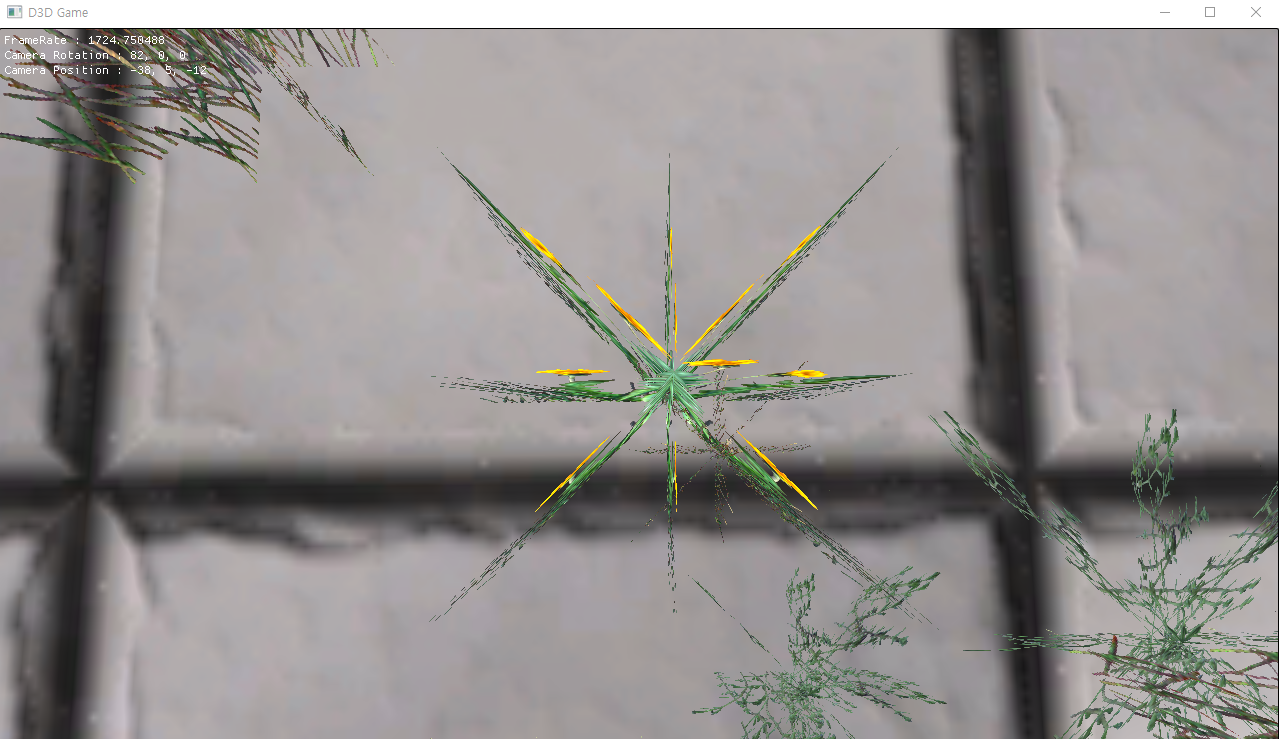
- GS Cross 대각선 면도 2개 추가해서(45도) 총 4개의 면으로 해보기
96_Billboard.fx 추가된 내용
더보기
...

[maxvertexcount(16)]
void GS_Cross2(point VertexOutput input[1], inout TriangleStream<GeometryOutput> stream)
{

    float3 up = float3(0, 1, 0);
    float3 forward = float3(0, 0, 1);
    float3 right = normalize(cross(up, forward));

    float2 size = input[0].Scale * 0.5f;

    float4 position[16];

    position[0] = float4(input[0].Position.xyz - size.x * right - size.y * up, 1);
    position[1] = float4(input[0].Position.xyz - size.x * right + size.y * up, 1);
    position[2] = float4(input[0].Position.xyz + size.x * right - size.y * up, 1);
    position[3] = float4(input[0].Position.xyz + size.x * right + size.y * up, 1);


    position[4] = float4(input[0].Position.xyz - size.x * forward - size.y * up, 1);
    position[5] = float4(input[0].Position.xyz - size.x * forward + size.y * up, 1);
    position[6] = float4(input[0].Position.xyz + size.x * forward - size.y * up, 1);
    position[7] = float4(input[0].Position.xyz + size.x * forward + size.y * up, 1);


    position[8] = float4(input[0].Position.xyz - size.x * (forward + right) - size.y * up, 1);
    position[9] = float4(input[0].Position.xyz - size.x * (forward + right) + size.y * up, 1);
    position[10] = float4(input[0].Position.xyz + size.x * (forward + right) - size.y * up, 1);
    position[11] = float4(input[0].Position.xyz + size.x * (forward + right) + size.y * up, 1);

    position[12] = float4(input[0].Position.xyz - size.x * (forward - right) - size.y * up, 1);
    position[13] = float4(input[0].Position.xyz - size.x * (forward - right) + size.y * up, 1);
    position[14] = float4(input[0].Position.xyz + size.x * (forward - right) - size.y * up, 1);
    position[15] = float4(input[0].Position.xyz + size.x * (forward - right) + size.y * up, 1);

    float2 uv[4] =
    {
        float2(0, 1), float2(0, 0), float2(1, 1), float2(1, 0)
    };

    GeometryOutput output;

    [unroll(16)]
    for (int i = 1; i <= 16; i++)
    {
        output.Position = ViewProjection(position[i - 1]);
        output.Uv = uv[(i - 1) % 4];
        // 그대로 보내준다.
        output.MapIndex = input[0].MapIndex;

        stream.Append(output);

        [flatten]
        if (i % 4 == 0)
            stream.RestartStrip();
    }

}
결과
대각선을 추가해서 어느방면에서 보아도 이전보다 더 자연스럽게 보인다.
'DirectX11 3D > 과제' 카테고리의 다른 글
| <DirectX11 3D 과제 > 68 - Unprojection을 이용한 이동 (0) | 2022.03.07 |
|---|---|
| <DirectX11 3D 과제> 42 - 모델 다운 받아 렌더링 해보기 (0) | 2022.02.15 |
| <DirectX11 3D 과제> 39 - Model(Bone + Mesh + Material) 탱크 움직이기 (0) | 2022.02.13 |
| <DirectX11 3D 과제> 39 - Model(Bone + Mesh + Material) 내용 정리 (0) | 2022.02.10 |
| <DirectX11 3D 과제> 39 - XML 파일 형식이란? (0) | 2022.02.10 |

